


Flight Tracker: Live Radar
0.00.00 Reviews
App Specs
- Version
- 3.0.5
- Updated On
- License
- Free
- Downloads
- 10,000+
- Developer
- GPS soft Labs
- Categories
- Travel & Local
- Platform
- Android
Screenshots
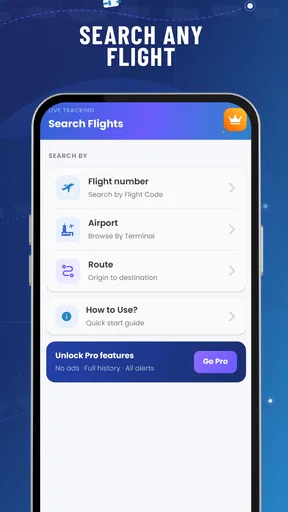
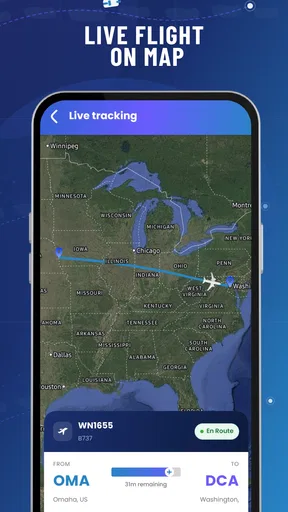
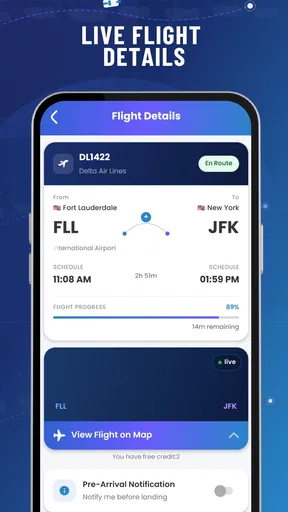
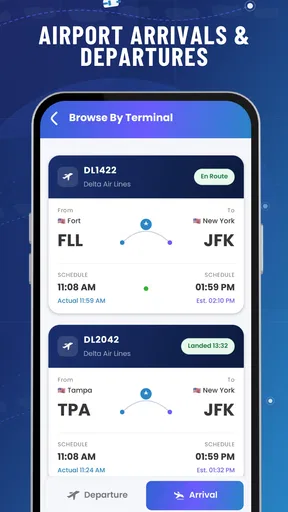
 Analysis by AppCompare
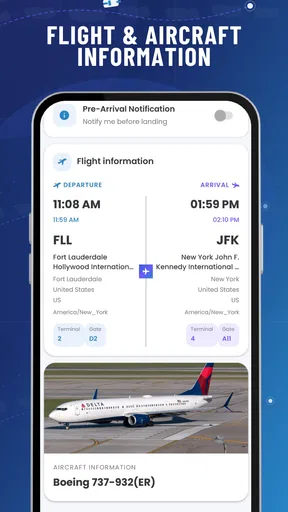
Flight Tracker: Live Radar is the kind of travel app I reach for when a flight is moving through several uncertain stages at once. A departure board can tell me that a plane is scheduled, but that is often not enough when I am deciding whether to leave home, wait at the airport, or pick someone up. This app brings live flight movement, status changes, delays, arrivals, departures, and alerts into one travel-focused screen, which makes it useful during those awkward gaps between a published schedule and what is actually happening.
After spending time with it, my impression is that its value depends heavily on the quality of the connection available at the moment I need it. That is not a criticism unique to this app; live tracking is inherently dependent on current information. Still, it changes how I use the app. I treat it as a quick decision tool rather than a permanent replacement for an airline’s own communication channels. When the network is stable, it can reduce uncertainty quickly. When the connection is weak or an airport’s information changes faster than the app refreshes, I need a backup habit.
How the live radar feels in real travel situations
The main appeal is the combination of a radar-style view and practical flight information. I can look at a route as something happening in the air, then switch my attention to the details that matter on the ground: whether a flight is departing, arriving, delayed, or still progressing. That combination is more useful to me than a map alone. A moving aircraft is interesting, but a movement paired with a current status gives the map a purpose.
I found the app most helpful before making a short, time-sensitive decision. Imagine that I am waiting for a relative whose arrival time has already become uncertain. Instead of repeatedly checking a message thread, I can open the tracker, locate the flight, and see whether the situation appears to be progressing. If the aircraft is still in the air, I may wait before driving to the airport. If the arrival stage is approaching, I can start planning the pickup. The app does not remove every uncertainty, but it can make waiting less passive.
The same workflow works for departures. I can check the flight before leaving for the airport and use the current status as one part of my decision. I would not use a radar position as permission to cut my travel time dangerously close, because airport security, boarding, traffic, and gate changes remain separate problems. The useful insight is that live location helps with timing, while the status information helps with interpretation. Neither should be treated as a guarantee.
Alerts are especially valuable when I cannot keep staring at the screen. A notification can turn the app from a manual checking tool into a background reminder for a meaningful change. I prefer setting up an alert before I become busy, rather than assuming I will remember to refresh the app every few minutes. This is one of the more practical ways to use it: prepare the tracking task early, then let the phone tell me when there is something worth checking.
There is also a difference between tracking a flight for curiosity and tracking it for responsibility. Aviation enthusiasts may enjoy watching routes develop, but a person collecting someone from an airport needs a simpler question answered: should I leave now, keep waiting, or verify the situation elsewhere? I think the app is strongest when I approach it with that second mindset. The radar is the visual layer; the status, delay, arrival, departure, and alert information are the parts that support an actual plan.
Worth Reading Before You Choose

Flipboard Shows What News Apps Must Do Beyond the Feed

Switching to Android Auto Means Rethinking Your Driving Routine

Google Calendar Makes a Crowded Week Easier to Manage

Ludo King Makes the Most of the Minutes Between Plans

Baby Panda World Brings Quick Play to Modern Phones, but Its Game Library Feels Busy

ESPN’s Live Game View Makes Following Close Games Easier
Why the internet connection matters more than it first appears
Live tracking is only as useful as the information reaching the phone. At home or on a dependable mobile connection, the experience feels straightforward: open the app, find the relevant flight, and read the latest available state. In a crowded terminal, underground transport area, parking structure, or international travel situation, the experience can be less predictable. A page that depends on fresh information may take longer to update precisely when I am most eager to see it.
This makes the app different from a static itinerary stored on my phone. A saved booking reference or calendar entry can still remind me of the planned schedule without a current connection. A live radar tracker has a different job. It is valuable because it can reflect movement and changes, so I need to think of connectivity as part of the feature rather than as an invisible technical detail.
My practical routine is to check important information while the connection is strong, especially before heading into a low-signal environment. I also keep the flight number and airport details available through another source when the trip matters. That is not because the app is pointless without perfect reception; it is because no live service should be my only plan when a missed pickup or missed departure would be expensive.
I would not describe this as an offline-first travel companion. The experience is centered on current tracking, and current tracking requires communication with the service. If I open it expecting a complete, continuously usable record in airplane mode or in a dead zone, I may be disappointed. The sensible approach is to use it when the phone can obtain fresh information and to keep essential travel details in a form that does not depend on immediate radar access.
Using it on a phone instead of relying on airport screens
Airport monitors remain useful because they are physically tied to the terminal and often show gate-specific information. The advantage of a phone app is different: I can check from the train, the car park, a hotel room, or a café. I do not need to be standing under the correct airport display to ask whether a flight is moving or delayed. For someone picking up a passenger, that mobility is a genuine benefit.
The app also suits people who are coordinating travel from a distance. A family member at home can follow an arrival while the traveler handles the airport. A colleague arranging a transfer can monitor a departure without asking the passenger to send repeated updates. In these situations, the radar view creates a shared point of reference, although I would still confirm important changes through official airline or airport channels.
On a small phone screen, the map can be less convenient than a compact status line when I am in a hurry. I tend to focus on the flight state first and use the map as context. That is a useful habit because a visual route can invite overinterpretation. Seeing an aircraft progress does not tell me everything about baggage delivery, gate assignment, immigration, or the time needed to reach the curb.
For that reason, I would not choose this app as my only airport guide. It belongs beside, not above, the airline app, airport information, and the traveler’s own itinerary. Its role is to answer movement and timing questions. It is not a substitute for every operational detail associated with a trip.
What I do when the app does not immediately show a clear answer
The most frustrating moment with any live tracker is not necessarily an error message. It is a result that seems incomplete, delayed, or ambiguous. A flight may have a published schedule while its actual movement is still changing. A weak connection may make the screen appear slower than expected. In that situation, repeatedly tapping without a plan does not improve the information.
My recovery process is simple. I first check that I am looking at the correct flight and airport, especially when two journeys share similar route details. I then give the app a moment to refresh rather than assuming that the first view is the final word. If the information affects a departure, pickup, or connection, I compare it with the airline or airport source. Finally, I use the most conservative realistic plan: leave enough time, wait for clearer confirmation, or contact the traveler directly.
This workflow exposes an important trade-off. The app can make live information easier to see, but it cannot force every source of aviation information to update at the same instant. A tracker may show that an aircraft is moving while a gate or boarding decision remains unsettled. That is why I value it for situational awareness, not as an official authorization to change a booking or ignore an airline instruction.
Alerts can reduce the need for constant checking, but I still pay attention to how I use them. If I monitor several flights at once, a stream of notifications could become distracting rather than helpful. I prefer assigning attention to the flight that affects my next decision. For a pickup, that might mean tracking the arriving service; for my own journey, it might mean watching the departure and checking official instructions separately.
Another useful recovery tip is to avoid making the map the sole source of truth. If the visual position seems surprising, I look at the written status and the schedule context before drawing a conclusion. The map is excellent for understanding direction and progress, but the textual state is usually closer to the question I am trying to answer. This two-layer check prevents me from turning a momentary visual impression into a rushed travel decision.
Keeping mobile data and battery use under control
A live radar app naturally encourages frequent viewing. That habit can matter when I am roaming, using a limited data plan, or trying to preserve battery during a long travel day. I do not leave the tracker open simply because a flight is interesting. I check at useful milestones: before leaving, after reaching the airport, around the expected departure, and when an alert or message suggests a change.
This is where alerts can be more efficient than manual refreshing. Instead of waking the screen over and over, I can let a relevant change prompt me to look. I still avoid treating notifications as a complete travel record, but they can reduce unnecessary checking. The best balance is to track only what has a practical consequence for me and close the app when I am no longer making a decision.
Connectivity also affects the cost of convenience. On home Wi-Fi, frequent map views are less concerning from a mobile-data perspective. On roaming data, I become more selective. I would open the app to answer a specific question rather than browse several routes casually. Travelers should also remember that the app’s usefulness may be reduced in places where reception is poor, so a data-conscious plan should include a non-live backup for essential schedule details.
Battery matters in the same way. A map-based live experience can keep me engaged with the screen longer than a simple text itinerary. I avoid tracking a flight continuously while my phone is already low on power, particularly before a long journey when I need the device for boarding information, messages, and transportation. A short check at the right time is usually more valuable than watching the aircraft icon for an hour.
These habits do not make the app less useful; they make the use more deliberate. The strongest setup is not constant monitoring, but timely monitoring with a backup plan. That is the difference between using live flight information intelligently and allowing it to become another source of travel anxiety.
Who will appreciate it, and who should choose another tool
I think this app is a good fit for people who regularly meet arriving passengers, coordinate family travel, or want a quick visual sense of whether a flight is progressing. It is also appealing to users who prefer a dedicated flight tracker instead of searching for a flight from scratch every time. The combination of radar, status details, delays, arrivals, departures, and alerts gives it a clear purpose in the Travel & Local category.
It is less suitable for someone who only needs a booking wallet, boarding pass, loyalty account, or direct airline support. An airline’s own app is usually the better first choice for check-in, seat information, baggage instructions, and changes that require an official response. An airport app or website may be preferable when the key question is a gate, terminal service, security information, or local facility.
I would also hesitate to recommend it as the sole tool for a complicated itinerary involving tight connections. Live movement can help me understand the first flight, but it does not automatically solve the consequences of a delay across multiple bookings. In that case, I want the airline’s rebooking process and the full itinerary beside the tracker.
The app is free to install, which makes trying it low-risk for a casual traveler. It is intended for Everyone, and it runs on Android devices using version eight or later. The current release is version three point zero point five, and GPS soft Labs is the developer behind it. The app has passed ten thousand installs, giving it a modest but meaningful presence for people looking for a dedicated tracking option.
There are in-app purchases ranging from four dollars and ninety-nine cents to ninety-nine dollars and ninety-nine cents per item. That is worth considering before treating the free installation as the complete cost of long-term use. I would begin with the basic experience and only consider a purchase if the additional value clearly matches how often I track flights. A person who checks one journey every few months may have a different calculation from someone coordinating travel every week.
My final view after using it as a connectivity-dependent travel tool
Flight Tracker: Live Radar works best when I use it for what it does well: turning a changing flight situation into something I can inspect quickly on a phone. The radar provides useful visual context, while statuses, delays, arrivals, departures, and alerts make the experience practical rather than merely decorative. For pickups and travel-day decisions, that combination can save repeated searches and reduce guesswork.
Its main limitation is also part of its identity. This is a live service, so a dependable connection and sensible expectations matter. I would not rely on it alone in a weak-signal environment, and I would not confuse aircraft movement with every official airport update. Keeping the airline or airport source nearby is not overcautious; it is the right way to handle information that can affect money, timing, and missed connections.
My recommendation is therefore positive but specific. If you want a focused flight-tracking app for checking movement and receiving useful changes, it is worth trying. If your priority is check-in, boarding passes, baggage support, or offline itinerary access, choose the airline’s tools or a broader travel organizer instead. For me, its real strength is giving a connected traveler a fast second opinion about what a flight is doing right now.
That makes it a practical companion for the waiting moments around a journey, provided I use it thoughtfully: check before entering a low-signal area, avoid draining the battery through constant viewing, confirm high-stakes changes through official sources, and keep a backup for essential details. Used that way, Flight Tracker: Live Radar earns its place on my travel phone without pretending to replace the rest of the travel toolkit.
Pros
- Real-time flight positions are easy to follow on the moving map.
- Search by flight number
- airport
- or airline is quick and convenient.
- Useful airport details include arrivals
- departures
- and terminal information.
- Flight status updates help track delays
- cancellations
- and schedule changes.
- Map controls make it simple to zoom in and focus on a specific route.
Cons
- Some advanced tracking features may require a paid subscription.
- Live radar data can be delayed or inaccurate in areas with limited coverage.
- Frequent notifications may feel excessive unless carefully customized.
- The map can use considerable battery and mobile data during long tracking sessions.
- Airport and flight information may vary in detail depending on the region.
FAQs for Flight Tracker: Live Radar
What is Flight Tracker: Live Radar and what can I use it for?
Flight Tracker: Live Radar is designed to help travelers monitor flights and view aircraft activity on an interactive map. After testing its main features, I found it useful for checking departure and arrival information, following a flight’s progress, and reviewing airport details. It can be handy before leaving for the airport, while waiting for someone, or during a trip when you want quick access to flight updates.
Does Flight Tracker: Live Radar provide real-time flight information?
The app presents flight positions, schedules, routes, and status information as live or near-real-time data, depending on the flight and the coverage available in your region. Updates may occasionally be delayed because information comes from external aviation data sources. For important travel decisions, such as confirming a cancellation, gate change, or boarding time, I recommend comparing the app’s information with the airline or airport’s official notifications.
Can I search for a specific flight, airport, or airline?
Yes, the app is primarily useful because it lets you look up flights and airports instead of relying only on the moving radar map. You can generally search using details such as a flight number, airport, route, or airline, depending on the version installed. Accurate results are easier to obtain when you enter the exact flight number and travel date, especially for routes operated by multiple airlines.
Does Flight Tracker: Live Radar require an internet connection or location access?
An internet connection is normally required to load current flight data, map tiles, airport information, and status updates. Location access may be requested to center the map on your position or show nearby airports, but it is not always necessary for manually searching flights. If privacy is important to you, you can usually deny location permission and still use the search features, although some location-based functions may be limited.
Is Flight Tracker: Live Radar free to download and use?
The app may be available as a free download, but some features can depend on advertising, in-app purchases, or a premium subscription. Before installing, check the current Google Play Store or Apple App Store listing for the exact pricing, trial conditions, and available features in your country. I also recommend reviewing subscription details carefully, since advanced tracking tools or an ad-free experience may require payment.


